

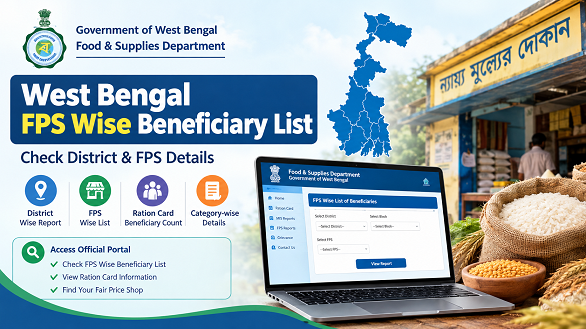
The West Bengal FPS Wise Beneficiary List helps users find official ration card beneficiary information associated with Fair Price Shops (FPS) across West Bengal. Through the West Bengal Food & Supplies Department portal, users can access FPS-wise reports, check beneficiary counts and explore ration card information for their area.
In this article, you will learn how to check the online, navigate district-wise reports, find your Fair Price Shop and access individual ration card details through official government links.
How to Check West Bengal FPS Wise Beneficiary List Online
Follow these steps to access the report through the Official website of Department of Food & Supplies Government of West Bengal.
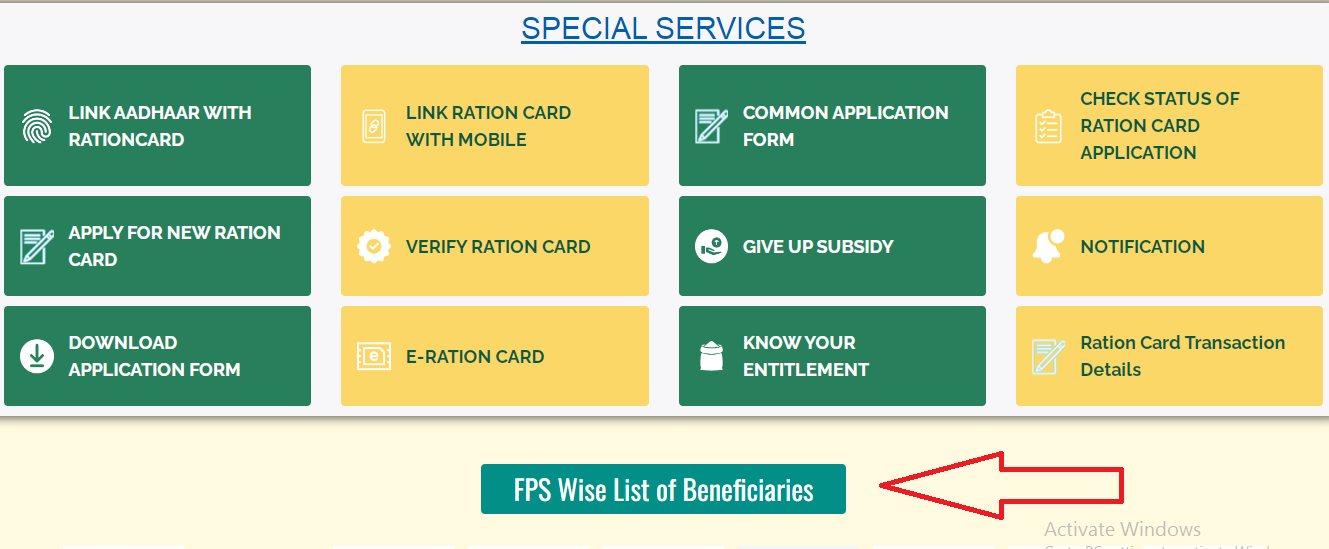
Step 1: Open the Official FPS Report
Visit the FPS Wise List of Beneficiaries CLICK HERE page.
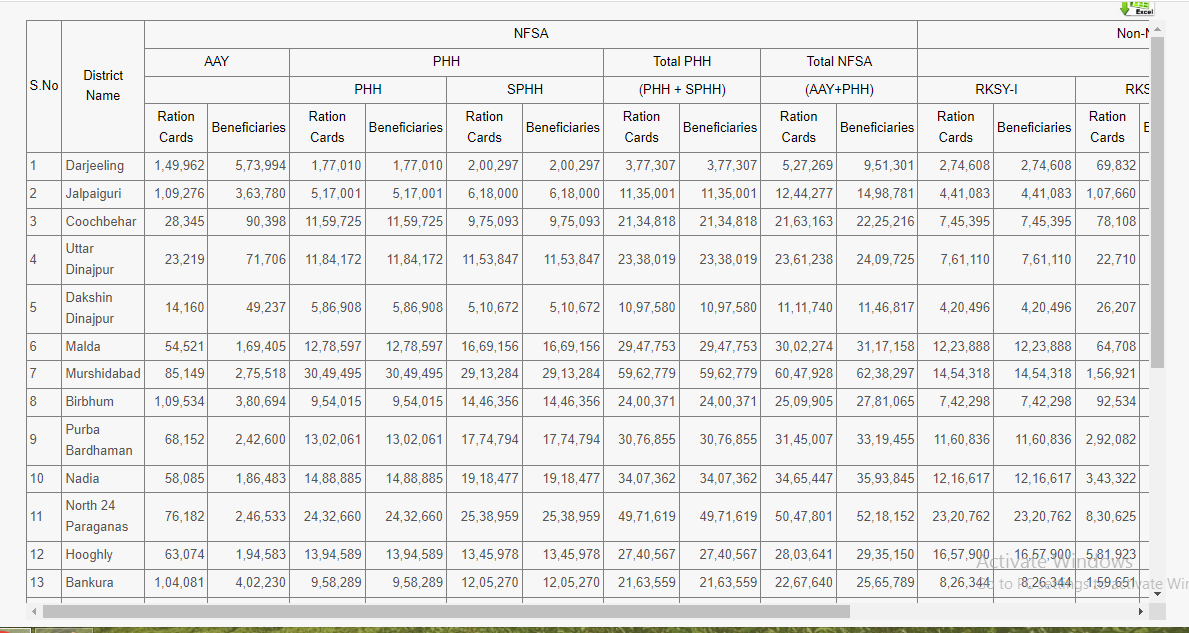
If the page loads successfully, review the district-wise information displayed on the screen.
Step 2: Select Your District
Find the district for which you want to check the beneficiary information. Open the relevant district entry or report link shown on the website.
Step 3: Select the Local Area
If the next page provides block, tehsil or other local-area options, select the area associated with your ration shop.
The available navigation may differ depending on the report.
Step 4: Find Your Fair Price Shop
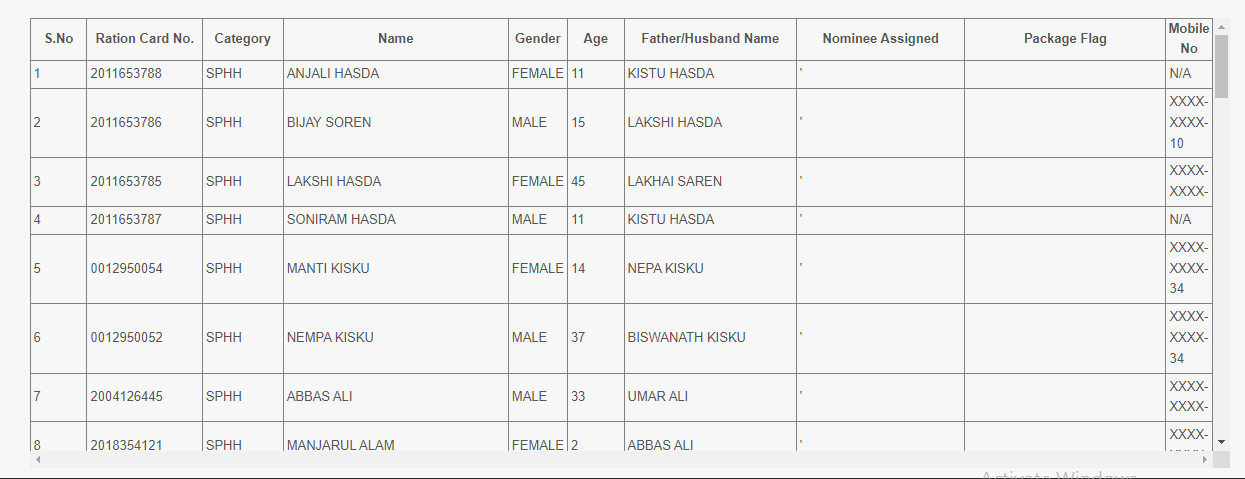
Look for the relevant FPS name or shop entry in the report. Check the available details to make sure you have selected the correct Fair Price Shop.
Step 5: Check the Beneficiary Information
Open the relevant report and review the available columns. These may include ration card counts, beneficiary counts and category-wise figures.
Remember that a count report may not show the names of every individual beneficiary.
How to Find Your Fair Price Shop in West Bengal
If you want to find beneficiary information for a particular ration shop, follow this process:
- Open the official FPS-wise report.
- Select the relevant district.
- Choose the block or local area, if the option is available.
- Look for your Fair Price Shop in the displayed report.
- Open the corresponding entry and review the available figures.
If you do not know your FPS name, you can use the official RCMS portal to search for your digital ration card details.
What Information Is Available in the FPS Wise Beneficiary List?
The information shown depends on the report you open. Common fields or figures may include:
| Information | Description |
|---|---|
| District | District covered by the report |
| Block or local area | Local administrative area, where provided |
| FPS Name | Name of the Fair Price Shop |
| Ration Card Count | Number of ration cards recorded in the relevant category |
| Beneficiary Count | Number of beneficiaries recorded in the relevant category |
| NFSA Figures | Information associated with applicable NFSA categories |
| State Scheme Figures | Information associated with state ration card schemes |
The report headings should be checked carefully before using or comparing figures.
West Bengal FPS Wise Beneficiary List by Ration Card Category
The official reports may show figures for different ration card categories. Common abbreviations include:
- AAY: Antyodaya Anna Yojana
- PHH: Priority Household
- SPHH: Special Priority Household
- RKSY-I: Rajya Khadya Suraksha Yojana-I
- RKSY-II: Rajya Khadya Suraksha Yojana-II
The categories available may vary by report. Refer to the official department website for current information about ration card categories and eligibility.
Does the FPS Wise Beneficiary List Show Individual Names?
Not necessarily. Some reports provide only ration card counts or beneficiary totals for each Fair Price Shop and category.
If you want to check the details of a particular ration card, use the individual inquiry service instead of relying on a count report.
Visit the official West Bengal RCMS portal and look for the option to search digital ration card details.
How to Search West Bengal Ration Card Details
To find information associated with an individual digital ration card:
- Open the official RCMS portal.
- Select the digital ration card details inquiry option.
- Enter the information requested by the website.
- Complete the verification step, if shown.
- Submit the form and review the available information.
The details displayed depend on the service and the record available in the department’s system.
How to Verify a West Bengal Digital Ration Card
You can also use the official verification service to check a digital ration card.
- Visit the Verify e-RC/DRC page.
- Select the card category if requested.
- Enter your ration card number.
- Complete the captcha or other verification shown.
- Submit the form and check the result.
If the page does not open, return to the official Food & Supplies Department website and locate the verification service again.
Difference Between FPS Wise Beneficiary List and Ration Card Details
| Feature | FPS Wise Beneficiary List | Individual Ration Card Details |
|---|---|---|
| Purpose | Check information organised by Fair Price Shop | Search information associated with a particular card |
| Access method | Navigate available district and FPS reports | Use the card inquiry service |
| Typical information | Counts and category-wise figures, depending on the report | Card-specific information available through the portal |
| Best suited for | Exploring FPS-wise beneficiary information | Checking your own ration card details |
What Is an FPS in West Bengal?
FPS stands for Fair Price Shop. These shops distribute foodgrains to eligible beneficiaries under the applicable Public Distribution System arrangements.
The FPS-wise reporting system organises certain ration card and beneficiary information by shop, making it easier to explore figures for a particular area.
What to Do If the FPS Wise Beneficiary List Is Not Opening
If you cannot access the report, try these options:
- Direct link not working: Visit the official department homepage.
- Report page unavailable: Open the MIS & Reports section.
- Cannot find your FPS: Confirm that you selected the correct district and local area.
- Only totals are displayed: Use the individual ration card inquiry service if you need card-specific information.
- Incorrect ration card information: Contact the department through the official website.
Important Official Links
| Service | Official link |
|---|---|
| FPS Wise Beneficiary List | Open Report |
| Food & Supplies Department | Open Website |
| MIS & Ration Card Reports | View Reports |
| Search Digital Ration Card Details | Open RCMS |
| Verify Digital Ration Card | Verify e-RC/DRC |
| Check Application Status | Open Status Service |
Frequently Asked Questions
1. How can I check the West Bengal FPS Wise Beneficiary List?
Open the official FPS-wise report, select your district and follow the available report options to find the relevant Fair Price Shop.
2. What is the official website for the FPS Wise Beneficiary List?
You can access the report through the official FPS-wise report link or start from the Food & Supplies Department website.
3. Can I check the beneficiary report by district?
Yes. The reporting system provides district-level information and further navigation where available.
4. Can I find the list by FPS name?
You can look for your Fair Price Shop in the FPS-level report after selecting the relevant district and local area, where those report levels are provided.
5. Does the report show all beneficiary names?
Not always. Some reports show beneficiary counts rather than individual names. Check the selected report’s headings and description.
6. What does FPS mean?
FPS means Fair Price Shop, a ration shop operating under the Public Distribution System.
7. What is the difference between ration card count and beneficiary count?
A ration card count measures cards, while a beneficiary count measures people recorded as beneficiaries. The two figures may differ.
8. Which ration card categories may appear in the report?
Depending on the report, categories may include AAY, PHH, SPHH, RKSY-I and RKSY-II.
9. How can I check individual ration card details?
Visit the official RCMS portal and use the digital ration card inquiry service.
10. What should I do if the official report does not open?
Visit the Food & Supplies Department homepage or the MIS & Reports page and access the report again.
Conclusion
The West Bengal FPS Wise Beneficiary List helps users explore official ration card and beneficiary reports organised by district and Fair Price Shop. By following the report navigation and checking the correct FPS entry, users can review the information available for their area.
For individual ration card information, use the official RCMS inquiry service. Always rely on the West Bengal Food & Supplies Department and its linked portals for the most reliable information.
